I instrumented my own product and the data killed my favorite feature
Koshell is a human-centric shared terminal: AI beside your terminal, not above it. Its signature interaction — the feature I designed the whole product around — is #?: when the terminal raises a question, you type #? and ask in place, and an answer streams in above your prompt while the terminal stays fully usable.
On July 4th I started a dogfooding experiment with a pre-registered kill criterion: do I keep reaching for #? in daily work? Not “does it feel promising”, not “did anyone say it’s cool” — a yes/no question that logged events would answer whether I liked the answer or not.
Three weeks later the data said no. This post is the full trace: how the instrumentation was designed, what the event log showed, how I read it, and the product decision that came out of it.
The instrument
Impressions are how dogfooding produces fiction, so before the experiment started, Koshell got a local event log (design 0007): one JSON object per line, appended to ~/.local/share/koshell/events.jsonl. Seven event types cover the loop — session_start, question_submitted, dispatched, first_delta, response_end, dispatch_failed, session_end — each stamped with a session id so questions can be joined to their latency spans.
Two design decisions mattered later:
The metrics were chosen before the data existed. The log was built to answer three pre-declared questions: how often does anchored streaming degrade, does the user actually type while an answer streams, and what do the latency distributions look like. That pre-commitment is what made the negative result trustworthy — I couldn’t move the goalposts after the fact, because the goalposts were in a design doc.
Privacy is structural, not procedural. The event structs have no field that could carry screen content or PTY bytes. The only free text in the schema is the question the user typed. Nothing is uploaded anywhere; this is a dogfooding instrument, not product telemetry. (It also means I can quote my own log below without redacting anything.)
The data
From July 4 to July 25 the log accumulated 1,539 events.
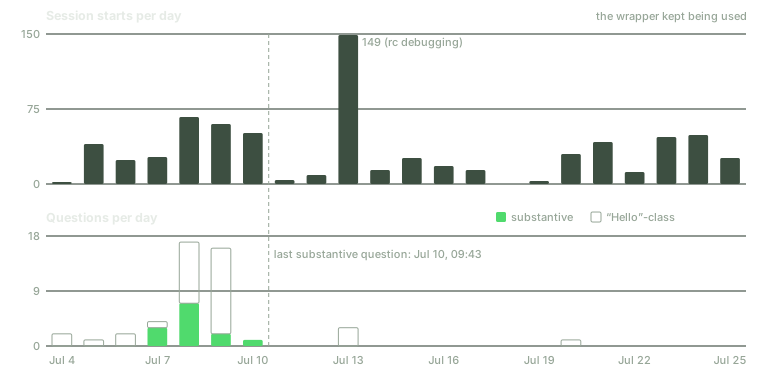
The headline split:
| Metric | Count |
|---|---|
| Session starts | 714 |
| Questions submitted | 47 |
| — “Hello”-class connectivity checks | 34 |
| — capability probes | 9 |
| — requests for an action | 1 |
| — genuine work questions | 3 |
714 session starts means the wrapper was adopted completely: auto-wrap worked, and effectively every terminal I opened for three weeks ran inside Koshell. (One 149-start day, July 13, is shell-rc debugging noise and should be discounted.) The infrastructure succeeded.
The ask loop is a different story. Of 47 questions, 34 were “Hello” — me checking the pipe was alive, usually after changing something. Nine were capability probes. One asked for an action. Exactly three were real work: “summarize this”, “analyze the projects in here”, “summarize pi’s changelog”.
The last substantive question was July 10, 09:43. For the following fifteen days the log shows sessions starting and ending, day after day — and four more “Hello”s. The wrapper stayed; the ask loop died.
Reading the trace
Aggregates say that it died. The sequence of questions says why, and it reads like a short story in three acts.
Act one, July 7–8: calibration. The probe cluster (translated from Chinese):
“What can you see right now? Report your side of things.” “Can you see past screen contents?” “What exactly is in the primary terminal context?” “I just launched lazygit — could you see that frame?”
This is a user building a mental model of the assistant’s perceptual boundary. That’s healthy first-contact behavior — but note what’s absent: none of these are work.
Act two, July 8, 11:42: the tell. The one action request in the entire log:
“Figure out a way to update this environment variable in every tmux pane.”
Koshell is observe-only by design — the AI can see the terminal but cannot touch it. So this question could only be answered with instructions, not with the fix. The single moment the assistant was asked to be genuinely useful beyond explanation, it hit the product’s own boundary. I asked for hands; my product offers eyes.
Act three, July 9 onward: abandonment. A cluster of “Hello”s while debugging configuration, one real question on July 10, then silence.
Latency data, for completeness: dispatch to first output was median 4.5 s, p90 ≈ 15 s, max 25.4 s, plus five dispatch failures from a daemon race. That’s not great — but latency is not what killed usage. The answers came; I stopped asking.
The instrumentation that never fired is also data
Two event types designed into the experiment never appeared in the log at all: anchored-streaming degradation events and typing-during-streaming events. The second one stings. Anchored streaming — answers rendering above a live, usable prompt line — is Koshell’s most intricate machinery, built to protect a behavior (typing while the AI responds) that, per the log, never happened once.
Dead instrumentation is a finding: I built invariant machinery for a scenario I imagined rather than one I observed. And a third gap: nothing in the schema measured whether an answer was useful. The experiment could detect abandonment but not diagnose answer quality. Both gaps go into the next iteration’s design.
The causal read
Why did an interaction I loved on paper die in three weeks? Two structural reasons, both visible in the trace:
1. A read-only assistant answering inline cannot carry macro intent. Anything bigger than “explain this screen” — refactor this, fix this, update that env var — belongs to a tool that can act on the answer. The July 8 action request is this thesis in a single log line. #? competes for exactly the questions where knowing is enough, and that slice of terminal life turned out to be thin for me.
2. My terminal already had eyes in it — worse eyes, but attached to hands. I live in tmux with coding agents in adjacent panes, and those agents read my terminal via tmux capture-pane: a raw, history-less, boundary-less screen scrape. As context, it is strictly worse than Koshell’s structured timeline. It didn’t matter. The scrape lives inside the tools that can act, so the marginal value of a better-seeing assistant that cannot act rounded to zero.
One honest caveat: this is an n=1 experiment, and the n is the founder. The persona #? was designed for — no tmux, no resident agent, live TUI trouble — is precisely the persona I am not. The data falsifies “the founder keeps reaching for #?”; it cannot speak for that other user. But a founder who doesn’t reach for his own product has no business polishing it on faith.
The decision
The tempting move was to treat this as a UX problem — tune latency, improve prompts, try again. That would be polishing a falsified interaction. The data supports a different reading: the part of Koshell that got adopted without friction was the observation layer — the wrapper that sees command boundaries, exit codes, per-command output, and TUI screens, and that ran 714 times without me ever thinking about it.
So the observation layer is being promoted from implementation detail to product core, shipped with two heads:
- A context provider for agents (the lead). The same structured terminal timeline, exposed to the coding agents that already live in my terminal — replacing their capture-pane scrape with command spans, exit codes, per-command output, and screen time-slices. My own agents become the first consumers, which fixes the experiment’s sample problem: the next dogfooding loop measures something I demonstrably do every day.
#?stays as a thin secondary head. It costs little to keep, it serves the non-tmux persona the experiment couldn’t test, and it preserves the point of the whole project: the human stays the primary operator of the terminal.
In a world where every agent can act, the scarce input is trustworthy context. Koshell competes on eyes, not hands.
The provider surface is now being designed in the open — instrumented from day one, this time with consumer-side signals, so the next verdict will be as unambiguous as this one. If three weeks of logs can kill your favorite feature, the logging worked.